Mobile Repair Basics: 10 Powerful Tips Every Smart Beginner Should Know (2025 Ultimate Guide) mobile repair basics 🔧 Introduction In today’s digital world, mobile phones have become a lifeline for communication, work, and entertainment. With millions of devices in use, the demand for mobile repair technicians is growing rapidly. If you're someone who loves technology or wants to start a new career, understanding mobile repair basics is the first step on your journey. Mobile repair basics cover everything from identifying phone components to safely opening a smartphone and diagnosing common issues. These foundational skills are essential whether you want to repair phones professionally or just fix your own. Without a strong grip on the basics, even experienced technicians can struggle with complicated repairs. One of the best things about learning mobile repair basics is that you don’t need a fancy degree or expensive equipment to get started. All you need...
Get link
Facebook
X
Pinterest
Email
Other Apps
CRT TV Color Issues: Fixing Red, Green, Blue Problems
Get link
Facebook
X
Pinterest
Email
Other Apps
-
CRT TV Color Issues: Fixing Red, Green, Blue Problems
CRT TV Color Issues: Fixing Red, Green, and Blue Problems Easily
introduction :
CRT TV Color Issues: Fixing Red, Green, Blue Problems
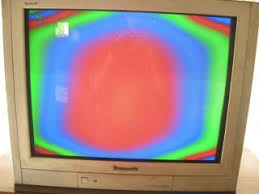
CRT TVs often develop color-related issues, such as excessive red, green, or blue dominance, resulting in distorted images. These problems can be due to various causes, including component failures, incorrect settings, or aging parts. In this guide, we’ll explore the common reasons for CRT TV color issues and how to fix them effectively.
Common Causes of CRT TV Color Problems
Misadjusted Color Settings
Incorrect settings in the TV menu can cause color imbalances.
Access the TV menu and adjust the color, contrast, and tint settings to see if the issue resolves.
Magnetization Issues
External magnetic fields can cause color distortion.
Use the TV’s built-in degaussing feature or a degaussing coil to fix color purity issues.
Loose or Faulty Video Cables
Poor cable connections can lead to missing or distorted colors.
Check and replace the AV cables if necessary.
Ensure that the cable connectors are free of dust and oxidation.
Faulty Picture Tube (CRT)
If one color is missing or dominant, the CRT’s electron guns might be faulty.
Professional servicing may be required.
Symptoms include a strong red, green, or blue tint across the screen.
Defective Components on the Main Board
Faulty resistors, capacitors, or transistors in the color circuit can cause issues.
Testing and replacing defective components can restore proper color balance.
Inspect for dry solder joints and resolder any broken connections.
Aging or Worn-Out CRT
Over time, the CRT’s phosphors degrade, leading to color problems.
In extreme cases, CRT replacement is needed.
Weak electron guns may cause fading colors.
How to Fix CRT TV Color Issues
Step 1: Check and Adjust Color Settings
Press the Menu button on your remote.
Navigate to the Picture Settings.
Adjust Color, Tint, Brightness, and Contrast to see if the problem improves.
If available, use the Reset to Default option.
Step 2: Perform Degaussing
If your TV has an automatic degaussing function, turn it off and on.
Use a degaussing coil to manually remove magnetic interference.
Keep external magnets and speakers away from the TV.
Step 3: Inspect and Replace Video Cables
Ensure AV cables are properly connected.
Replace damaged or loose cables with high-quality ones.
Use shielded cables to minimize interference.
Step 4: Open the TV and Check Internal Components (For Experts)
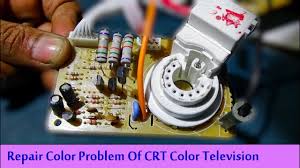
crt tv color issues check this board..
Discharge the CRT before working on the internal circuits.
Check for burnt resistors, capacitors, or transistors in the color circuit.
Replace any defective components with compatible parts.
Inspect the neck board at the back of the CRT for faulty connections.
Step 5: Adjust the CRT Screen and Focus Controls
Locate the screen/focus adjustment on the flyback transformer.
Carefully turn the screen control slightly to balance the colors.
Adjust focus if the image appears blurry.
Step 6: Seek Professional Repair If Needed
If the issue persists, consult a TV repair technician for a thorough diagnosis.
Some high-voltage components require specialized tools and knowledge to repair safely.
Preventive Maintenance Tips
Avoid placing speakers or magnets near your CRT TV.
Clean the vents and ensure proper airflow to prevent overheating.
Use a voltage stabilizer to protect against power fluctuations.
Regularly inspect internal components for signs of wear or damage.
Conclusion
By following these troubleshooting steps, you can resolve most CRT TV color issues and restore a balanced picture. Regular maintenance and proper handling can also help extend the life of your CRT TV. If the problem persists despite these fixes, it may be time to consider upgrading to a modern display technology.
How to Repair 220V AC to 5V DC SMPS Power Supply Easily – Complete 2025 Guide SMPS Repair • 2025 Updated How to Repair 220V AC to 5V DC SMPS Power Supply Easily – Complete 2025 Guide In this detailed guide, you will learn how a 220V AC to 5V DC SMPS power supply works and how to repair it step by step. We will cover safety rules, internal blocks, every important component, and a practical troubleshooting flow used by professional technicians. 🔧 Skill Level: Beginner to Intermediate ⚡ Input: 220V AC • Output: 5V DC SMPS 📅 Updated for: 2025 Quick Navigation Table of Contents 1. Introduction: What Is a 220V AC to 5V DC SMPS? 2. Safety First: High Voltage Precautions 3. Tools and Basic Skills You Need...
How to Assemble a 5.1 Amplifier Easily (2025 Full Guide) | Tamil Technicians English How to Assemble a 5.1 Amplifier Easily – Complete 2025 Guide Want to build your own 5.1 home theater amplifier at home or in your small workshop? In this Tamil Technicians guide we will see what components you really need, how to wire everything safely, how to choose the correct speakers and ohms, and how to remove hum and noise like a pro. DIY Audio Repair Beginner + Technician Friendly Updated for 2025 Many technicians and hobbyists love to assemble an amplifier, but get confused when it comes to 5.1 systems – there are more channels, more wires and more chances for ...
Fix Low or Distorted Audio in CRT TVs – Ultimate Troubleshooting Guide Introduction Having trouble with low or distorted audio in CRT TVs ? This issue can be frustrating, but don’t worry! Audio problems in CRT TVs are common, especially in older models that have been in use for several years. Poor sound quality can result from various factors, including damaged components, improper settings, or electrical issues. Identifying the root cause is crucial for an effective fix. Fortunately, many of these problems can be resolved with simple troubleshooting techniques that don’t require advanced technical knowledge. A CRT TV’s sound system is not as sophisticated as modern flat-screen TVs, but it is still designed to produce clear audio. If you notice distortion, muffled sounds, or extremely low volume, your TV may be suffering from a technical issue. This could be due to internal components failing over time, interference from nearby devices, or simple misconfigurations in...



Comments
Post a Comment